Visualizzazione post con etichetta Oracle SQL Developer Data Modeler. Mostra tutti i post

lunedì 4 novembre 2013

Oracle Tip: Generating Documentation Reports with Oracle SQL Developer Data Modeler

This is another tip for the lazy programmer. When it comes to documentation, no developer would like to go back extracting the code for every single table in his model.
Oracle SQL Developer Data Modeler has a very useful tool for generating reports.


Selecting Reports from the File Menu, you can choose if you want it generated in:
  • RTF
  • PDF 
  • HTML 
format.
You can create a template (e.g. if you want to select only tables of your models) or selecting only some objects of your model.
When you execute the report, it will be stored in a local route.
This is how a PDF report looks like. Ready to be sent to the customer or do some nice cut&paste from it.


lunedì 22 aprile 2013

Tip: Oracle Data Modeler How to display just object names in a diagram

You may need to put your logical or physical diagram in a PowerPoint presentation, but it is quite unpractical showing all columns and details of a table. If you just want to show the Object Name, you have to go to View -> Details -> Only Names.


Then, you can give a better look to your diagram by customizing the look and feel and the best thing is that you can always go back to the full view.

venerdì 15 marzo 2013

Tip: Reverse Engineering in Oracle Data Modeler

I am currently building a Data Warehouse using OWB as integration tool. I have almost finished and now comes what I like the less about my job... documentation!
During the development process, you usually create a number of staging tables. Oracle Data Modeler allows you to import tables from a schema. This way it is much easier writing down your documentation and you also have a visual presentation ready to use.
Let's go through the reverse engineering process:
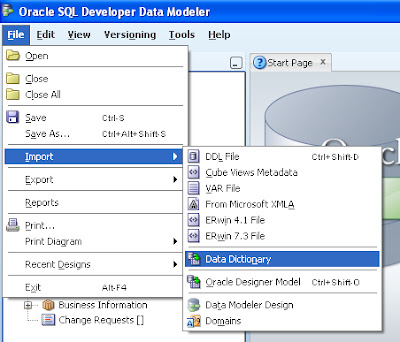
1) Go to File -> Import -> Data Dictionary


2) Add a new connection if you haven't set up any yet

3) Select your Schema/Database


Personally I find the filter option pretty useful for retrieving quickly the Schema you are looking for.

4) Select the objects you want to import


5) Click on Finish

If everything goes ok, you have your Model imported in Oracle Data Modeler and you can export images of your diagrams or generate your DDL code to attach to your documentation.  


mercoledì 23 gennaio 2013

Tip: Oracle SQL Developer Data Modeler Create Sequence for an auto incrementing ID

Recently I have started using this tool from Oracle and I must admit it is brilliant for designing Star Schemas and generating DDL code.
For my project I need to define an auto incrementing ID field for several tables of my model. I obviously needed a sequence for each and I was looking for a way to define it in the Data Modeler.
Oracle Data Modeler allows you to mark any column field as auto-incrementing. Select the table in your model and double click on the column. In the example below, I want the primary key field to be auto-incrementing.


Select the option Auto-Incrementing in the Column Property panel.


If you check the DDL you will see the code for the sequence and the trigger that is fired whenever a new line is inserted into the table.

CREATE SEQUENCE CNE_CNEIDE_SEQ
    NOCACHE
    ORDER ;

CREATE OR REPLACE TRIGGER CNE_CNEIDE_TRG
BEFORE INSERT ON T_CANAL_ENTRADA
FOR EACH ROW
WHEN (NEW.CNEIDE IS NULL)
BEGIN
    SELECT CNE_CNEIDE_SEQ.NEXTVAL INTO :NEW.CNEIDE FROM DUAL;
END;
/


If you don't need the trigger, just untick the option in the Auto Increment panel.