Visualizzazione post con etichetta PL/SQL. Mostra tutti i post

lunedì 30 ottobre 2017

[Oracle Tips] Looping over dates in PL/SQL

How do you loop over dates if you want to build your own calendar?
I had to generate a weekly calendar that had every week starting on the previous Saturday of a given date and ending on the next Friday. 
The following procedure solved my problem. The procedure takes two parameters: 
- PROCESS_START_DT (DATE)
- PROCESS_END_DT (DATE)
that define the time interval for which the calendar needs to be generated. 
I.e. If PROCESS_START_DT = '01-Jul-2017' and PROCESS_END_DT = '31-Jul-2017', the expected result will be: 


The result will be stored in a dedicated table. 
The key is to determine the day of the week given a date, in order to establish the previous Saturday and next Friday. To do that, we use the TRUNC(cut_date, 'IW') which will return the first day of the  ISO week. Using simply TRUNC would make the code dependent on the local NLS parameters.  
To loop from the Start Date to the End Date, we convert the dates to the julian format (to_number(to_char(PROCESS_START_DT,'j'))) and we implement a numeric loop starting from the PROCESS_START_DT (temporarly stored in cut_date variable) and we increment it by 7 days at each iteration (cut_date := cut_date + 7)

create or replace PROCEDURE PR_XXX_XXX_GENERATE_CAL(PROCESS_START_DT DATE, PROCESS_END_DT DATE) AS  
cut_date date;
cal_year number;
st_dt date;
end_dt date;
cal_week_nbr number;
table_exists_flg number;
diff_days number; 
begin

/* Reset Variables */ 
cut_date := PROCESS_START_DT;
cal_week_nbr := 1; 

select count(*) into table_exists_flg
from all_tables
where table_name = upper('wc_xxx_xxx_calendar');

/* If the calendar table does not exists, then create it */
if table_exists_flg = 0 then 

execute immediate 'create table wc_xxx_xxx_calendar
(CAL_YEAR NUMBER,
CAL_WEEK_NBR NUMBER,
EFFECTIVE_START_DT DATE,
EFFECTIVE_END_DT DATE)';

end if;

/* Truncate Calendar Table */ 
execute immediate 'truncate table wc_xxx_xxx_calendar';
commit;

for i in to_number(to_char(PROCESS_START_DT,'j'))..to_number(to_char(PROCESS_END_DT,'j')) loop

/* Make sure that always previous Saturday and next Friday are retrieved, independently of the DB Localization */
if  to_date(i,'j') = cut_date then 

/* Removed because it depends on Localization */ 
/* select EXTRACT(YEAR FROM cut_date), trunc(cut_date, 'd')-2 , trunc(cut_date, 'd')+4  */ 

/* Calculate difference in days from cut_date and previous Monday */
select  cut_date - trunc(cut_date, 'IW') into diff_days 
from dual; 

if (diff_days >= 5) then 
/* cut_date is a Saturday or Sunday - always current Saturday is returned */ 
select EXTRACT(YEAR FROM cut_date), trunc(cut_date, 'IW')+5 , trunc(cut_date+7, 'IW')+4  
into cal_year, st_dt, end_dt
from dual; 
else 
/* Any weekday - except for Saturday and Sunday */
select EXTRACT(YEAR FROM cut_date), trunc(cut_date, 'IW')-2 , trunc(cut_date, 'IW')+4  
into cal_year, st_dt, end_dt
from dual; 
end if; 

insert into wc_xxx_xxx_calendar values (cal_year, cal_week_nbr, st_dt, end_dt);
COMMIT; 

cal_week_nbr := cal_week_nbr + 1;
cut_date := cut_date + 7;

end if;

END LOOP;

END PR_XXX_XXX_GENERATE_CAL;

lunedì 3 marzo 2014

Oracle Tip: Comment SQL Code in SQL Developer

When working with PL/SQL procedures, you'll have to comment (and uncomment) frequently part of the code.
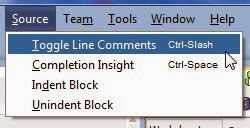
A quick way to do it with Oracle SQL Developer is selecting the block of code you want to comment and use the shortcut:

Ctrl + '/'(slash)

Alternatively, you can choose the option 'Toggle Line Comments' from the menu 'Source' (in version 4 and above of SQL Developer). In previous versions, use the menu 'Edit -> Source'.

To remove comments, just use the same command.

lunedì 15 luglio 2013

Oracle Tip: ORA-30657 External Table Error

I was trying to load a CSV file into an external table. I copied the definition of the table from the final target table, adding the external table parameters: 

CREATE TABLE T1 
(field1 VARCHAR2(25) NOT NULL, 
field2 VARCHAR2(80) NOT NULL,
...
fieldn NUMBER)
ORGANIZATION EXTERNAL
(TYPE oracle_loader
DEFAULT DIRECTORY <oracle_directory_object_name>
ACCESS PARAMETERS (
RECORDS DELIMITED BY newline
BADFILE <file_name>
DISCARDFILE <file_name>
LOGFILE <file_name>
FIELDS TERMINATED BY '<terminator>'
LOCATION ('<file_name>'));

When I compiled the table, I got the following error. 


ORA-30657:  Operation not supported on external organized table  

Cause: User attempted on operation on an external table which is not supported.  

Action: Don't do that!


Quite hilarious... but what did I do wrong? The Oracle error message did not help me at all (and who could ever help?). I checked the directory. It was there and its name was typed correctly. File names were ok. So what was the issue? 

It was as easy as removing the NOT NULL clause on the field specification.  


CREATE TABLE T1 
(field1 VARCHAR2(25) NOT NULL, 
field2 VARCHAR2(80) NOT NULL,
...
fieldn NUMBER)
ORGANIZATION EXTERNAL
(TYPE oracle_loader
DEFAULT DIRECTORY <oracle_directory_object_name>
ACCESS PARAMETERS (
RECORDS DELIMITED BY newline
BADFILE <file_name>
DISCARDFILE <file_name>
LOGFILE <file_name>
FIELDS TERMINATED BY '<terminator>'
LOCATION ('<file_name>')


Silly error, but it took me a while to find out what was wrong. Hope this helps. 

martedì 21 maggio 2013

ORA-02292: integrity constraint (.) violated - child record

I was writing an ODI procedure from creating a static dimension from scratch. The procedure looked like this:

begin
DELETE FROM <DIM_TABLE>;
INSERT INTO <DIM_TABLE> VALUES (0,1,etc.);

COMMIT;
end


When I run it, I got the following error:

ORA-02292: integrity constraint (<OWNER>.<FK_CONSTRAINT>) violated - child record

The error means that I was trying to delete values that were used in a column that had a foreign key constraint on it.
To overcome this issue, without deleting any value in the referencing table, you first have to disable the constraint and then enable it again once you have finished populating the table.
So the procedure will look like this:


begin
execute immediate 'ALTER TABLE <DIM_TABLE> DISABLE CONSTRAINT <OWNER>.<FK_CONSTRAINT>';
DELETE FROM <DIM_TABLE>;
INSERT INTO <DIM_TABLE> VALUES (0,1,etc.);
COMMIT; 

execute immediate 'ALTER TABLE <DIM_TABLE> ENABLE CONSTRAINT <OWNER>.<FK_CONSTRAINT>';
end