Visualizzazione post con etichetta Oracle. Mostra tutti i post

lunedì 30 ottobre 2017

[Oracle Tips] Looping over dates in PL/SQL

How do you loop over dates if you want to build your own calendar?
I had to generate a weekly calendar that had every week starting on the previous Saturday of a given date and ending on the next Friday. 
The following procedure solved my problem. The procedure takes two parameters: 
- PROCESS_START_DT (DATE)
- PROCESS_END_DT (DATE)
that define the time interval for which the calendar needs to be generated. 
I.e. If PROCESS_START_DT = '01-Jul-2017' and PROCESS_END_DT = '31-Jul-2017', the expected result will be: 


The result will be stored in a dedicated table. 
The key is to determine the day of the week given a date, in order to establish the previous Saturday and next Friday. To do that, we use the TRUNC(cut_date, 'IW') which will return the first day of the  ISO week. Using simply TRUNC would make the code dependent on the local NLS parameters.  
To loop from the Start Date to the End Date, we convert the dates to the julian format (to_number(to_char(PROCESS_START_DT,'j'))) and we implement a numeric loop starting from the PROCESS_START_DT (temporarly stored in cut_date variable) and we increment it by 7 days at each iteration (cut_date := cut_date + 7)

create or replace PROCEDURE PR_XXX_XXX_GENERATE_CAL(PROCESS_START_DT DATE, PROCESS_END_DT DATE) AS  
cut_date date;
cal_year number;
st_dt date;
end_dt date;
cal_week_nbr number;
table_exists_flg number;
diff_days number; 
begin

/* Reset Variables */ 
cut_date := PROCESS_START_DT;
cal_week_nbr := 1; 

select count(*) into table_exists_flg
from all_tables
where table_name = upper('wc_xxx_xxx_calendar');

/* If the calendar table does not exists, then create it */
if table_exists_flg = 0 then 

execute immediate 'create table wc_xxx_xxx_calendar
(CAL_YEAR NUMBER,
CAL_WEEK_NBR NUMBER,
EFFECTIVE_START_DT DATE,
EFFECTIVE_END_DT DATE)';

end if;

/* Truncate Calendar Table */ 
execute immediate 'truncate table wc_xxx_xxx_calendar';
commit;

for i in to_number(to_char(PROCESS_START_DT,'j'))..to_number(to_char(PROCESS_END_DT,'j')) loop

/* Make sure that always previous Saturday and next Friday are retrieved, independently of the DB Localization */
if  to_date(i,'j') = cut_date then 

/* Removed because it depends on Localization */ 
/* select EXTRACT(YEAR FROM cut_date), trunc(cut_date, 'd')-2 , trunc(cut_date, 'd')+4  */ 

/* Calculate difference in days from cut_date and previous Monday */
select  cut_date - trunc(cut_date, 'IW') into diff_days 
from dual; 

if (diff_days >= 5) then 
/* cut_date is a Saturday or Sunday - always current Saturday is returned */ 
select EXTRACT(YEAR FROM cut_date), trunc(cut_date, 'IW')+5 , trunc(cut_date+7, 'IW')+4  
into cal_year, st_dt, end_dt
from dual; 
else 
/* Any weekday - except for Saturday and Sunday */
select EXTRACT(YEAR FROM cut_date), trunc(cut_date, 'IW')-2 , trunc(cut_date, 'IW')+4  
into cal_year, st_dt, end_dt
from dual; 
end if; 

insert into wc_xxx_xxx_calendar values (cal_year, cal_week_nbr, st_dt, end_dt);
COMMIT; 

cal_week_nbr := cal_week_nbr + 1;
cut_date := cut_date + 7;

end if;

END LOOP;

END PR_XXX_XXX_GENERATE_CAL;

mercoledì 23 agosto 2017

[Oracle Tips] Changing Default End Date in SCD KM

ODI has an IKM for Loading SCD Type 2 dimensions. The IKM is 'IKM Oracle Slowly Changing Dimension'. The default value for Slow Changing Dimension (SCD) Type 2 End Date is "01 January 2400".
You may need to change this End Date value because of the source data that you are using to populate the Slowly Changing Dimension. In a recent project, I had to deliver an integration between Oracle Fusion HCM and an on-premise DWH. The End Date for Fusion HCM objects is "31-December-4712". So, if you want to use the ODI IKM to create SCDs you need to customize it.
To do so, first you need to create a copy of the default IKM.

Then open the duplicated object and locate the steps where the default End Date is used.
The step that needs to be customized is 'Insert flow into I$ table'. Edit the Target code to replace '2400-01-01' with '4712-12-31' or whichever value you want to use as End Date.


Once it is done, then you can use this customized IKM in your interfaces for populating SCDs Type 2. 


martedì 22 agosto 2017

[Oracle Tips] Looking for a value in all table columns of a database schema

I have been working on a project where honestly I did not have much knowledge of the data model of the schema I was using. Most of the times I had to figure out in which table (and column) I could find a certain value. Not the best strategy, but Oracle documentation and the project schedule were not not of much help.
The following procedure was extremely useful and has helped me out in many occasions. Depending on the size of the tables that are being scanned, the procedure can take quite a long time to be executed, but it will retrieve all the values that match 'v_search_string' in any column of the datatype and the schema specified as a parameters.

set serveroutput on size 100000;

declare
    v_match_count integer;
    v_counter integer;

    -- The owner of the tables to search through (case-sensitive)

    v_owner varchar2(255) := 'SCHEMA_OWNER';
    -- A string that is part of the data type(s) of the columns to search through (case-insensitive)
    v_data_type varchar2(255) := 'COLUMN_DATATYPE';
    -- The string to be searched for (case-insensitive)
    v_search_string varchar2(4000) := 'VALUE_TO_BE_SEARCHED';

    -- Store the SQL to execute for each table in a CLOB to get around the 32767 byte max size for a VARCHAR2 in PL/SQL
    v_sql clob := '';
begin
    for cur_tables in (select owner, table_name from all_tables where owner = v_owner and table_name in
                       (select table_name from all_tab_columns where owner = all_tables.owner and data_type like '%' ||  upper(v_data_type) || '%')
                       order by table_name) loop
        v_counter := 0;
        v_sql := '';

        for cur_columns in (select column_name from all_tab_columns where
                            owner = v_owner and table_name = cur_tables.table_name and data_type like '%' || upper(v_data_type) || '%') loop
            if v_counter > 0 then
                v_sql := v_sql || ' or ';
            end if;
            v_sql := v_sql || 'upper(' || cur_columns.column_name || ') like ''%' || upper(v_search_string) || '%''';
            v_counter := v_counter + 1;
        end loop;

        v_sql := 'select count(*) from '  || v_owner || '.' || cur_tables.table_name || ' where ' || v_sql;

        execute immediate v_sql
        into v_match_count;

        if v_match_count > 0 then
            dbms_output.put_line('Match in ' || cur_tables.owner || ': ' || cur_tables.table_name || ' - ' || v_match_count || ' records');
        end if;
    end loop;

    exception
        when others then
            dbms_output.put_line('Error when executing the following: ' || dbms_lob.substr(v_sql, 32600));
end;
/


Here is the output of the procedure if I look for 'CRISTINA' string of 'VARCHAR' type in any table column in the 'A' schema: 


Note: the procedure will work only if you have the right privileges to query all_tables and all_tab_columns and you have at least read privileges to the schema
 

mercoledì 31 maggio 2017

ODI Tips: ODI initialization hangs

I have been on the same OBIA/ODI project for almost two years now and every now and then I get this issue.
ODI Studio hangs on ODI initialization - Initialize Search Engine window.


No matter how much patiently you wait, it won't allow you to progress further.
The only option you have is to:
  1. Kill ODI Studio process using Task Manager
  2. Locate windowinglayout.xml file in your computer. Typically, you will find it under: C:\Users\<USER>\AppData\Roaming\odi\system11.1.1.9.0\o.ide.11.1.1.9.40.66.73   

  3. Delete the file and restart ODI Studio


giovedì 26 gennaio 2017

Oracle Tip: recovering SQL Developer passwords

I must admit that I am quite lazy (and not a very tidy person either). When I am given a new database connection to work with, I configure it in SQL Developer and save the password (so I do not have to type it when I connect and, more important, I do not have to remember it or store it safely somewhere else - shame on me!). As a consequence, when I am ask to provide the password to somebody else, it happens quite often that I do not remember it.
SQL Developer stores the saved passwords in an encrypted fashion in a file called connections.xml, which is normally available in \AppData\Roaming\SQL Developer\system folder.


Googling around, I have found a number of Java routines that can decrypt the passwords, but why spending time in compiling some Java code if a solution is already available?
This link http://show-me-password.tomecode.com has the instructions for installing a simple SQL Developer extension. It works great and it's the perfect shortcut for a lazy and forgetful programmer.

mercoledì 18 gennaio 2017

ODI Tip: Get Physical Schema from Logical Schema in an ODI variable

When it comes to file paths you do not want to hard-code them because they will need to be manually updated when you migrate from one environment to another.
The best way to retrieve a file path at runtime is to get it from the physical schema that you have configured in the Topology.
You can create an ODI variable and use the following code for its refresh:


select '<%=odiRef.getSchemaName("EXTRACT_FILES_LS","W")%>' 
from dual

where EXTRACT_FILES_LS is the Logical Schema name.


When you migrate to a new environment, the only thing that will need to be updated is the Topology Physical Schema and by refreshing the variable you will have the updated file path.

martedì 11 ottobre 2016

Oracle Tip: executing SQL scripts in SQL Developer

One common problem with SQL Developer is executing huge SQL scripts (i.e. INSERT statements from the export of a big table).
Typically you will get the following error when trying to open the file: 


which is caused by an OutOfMemoryError of the Java Heap space.


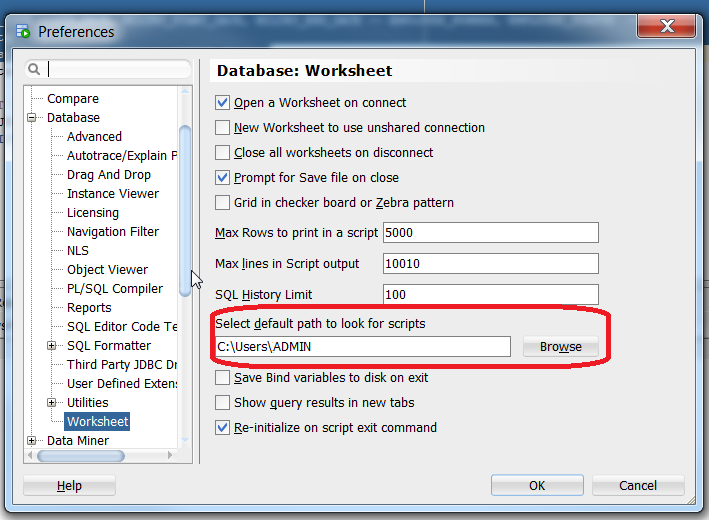
One convenient way to execute .sql without having to open the script in the SQL Developer editor is to configure the default path for scripts.
Go to Tools -> Preferences->Database->Worksheet:


and select the path where you want to place the SQL scripts to execute.
Then, go to the SQL Developer editor and simply use the @ command to reference and execute the script.


lunedì 10 ottobre 2016

ODI Tip: Generating flat files with spaces in column names

I had a requirement of generating a .csv file with header out of a database table.
I had created the model as follows:
  • File Format: Delimited
  • Record Separator: Unix  
  • Field Separator: , (comma)
In the interface, I had placed the file as Target Datasource and used 'IKM SQL to File Append' with the following options:


Unfortunately, the header columns were truncated at the first space and adding double quotes did not help. The column header were all truncated after the first space found.
After investigating, I came to the conclusion that there is was no quick or easy way to deal with spaces. I guess the only way is creating a custom version of the IKM.
Therefore, since I have very little time, I have replaced the spaces with underscores and added a OdiOSCommand in the package to replace the underscores with spaces in the output file.


ODIOSCommand is a more flexible version of OSCommand and allows you to invoke a sed command to do the replacement in place (-i) of the underscores with spaces.

sed -i 's/_/ /g' <filename>

lunedì 18 luglio 2016

Oracle Tip: Exception getObjectName("R", "OBI_EXEC_SESS_<$=Y$>", "D")

When running OBIA Load Plan, today I got into the following error when running SIL_DomainGeneral_CM_Source_Load scenario:


com.sunopsis.tools.core.exception.SnpsSimpleMessageException: ODI-17517: Error during task interpretation.
 Task: 6
java.lang.Exception: The application script threw an exception: com.sunopsis.tools.core.exception.SnpsSimpleMessageException: Exception getObjectName("R", "OBI_EXEC_SESS_<$=Y$>", "D") :  BSF info: Run Alter Session Commands-SRC (DB Link) at line: 0 column: columnNo


The solution to this error is given in Doc ID 1948605.1 from Oracle Support.
You should connect to ODI Physical Architecture in ODI Topology and check that BIAPPS_BIACOMP has got a Default Schema defined (and that connectivity is in place). If there is no Physical Schema defined, then check the option. 


If this does not solve the problem, check BIAPPS DWH Physical Connection. Make sure that at least one of the physical schemas is marked as Default Schema.


Somehow during migration activities, we lost the selection on one of them.


lunedì 29 febbraio 2016

Configuring PGP Keys in GNU Private Guard

Imagine you are receiving a PGP encrypted file from a third-party. 
The file has been encrypted using the customer's Public Key and now you have to decrypt it in a separate server where Gnu PG is installed. 
The first thing you need to do is to import the keys so they can be used to decrypt the message.
The following command is used to import the Public Key: 

gpg --import newkey.txt
 
If a valid Public Key is given, this is how the command output should look like: 

bash-4.1$ gpg2 --import newkey.txt
gpg: key xxxxxx: "Public Key Description <email@xxx.com>" not changed
gpg: Total number processed: 1
gpg:              unchanged: 1
 

To import the Private Key, use the following command: 

gpg --allow-secret-key-import --import newpriv_key.txt
 
To check if keys have been imported correctly, you can use the following command:

bash-4.1$ gpg --list-keys
/xxxx/xxxxx/.gnupg/pubring.gpg
-----------------------------------
pub   2048R/xxxxxxx 2016-02-17 [expires: 2019-02-16]
uid                 Public Key Description <email@xxx.com>

sub   2048R/xxxxxxx 2016-02-17 [expires: 2019-02-16]

The Private Key provided has got a passphrase. So if you want to decrypt a sample file that has been encrypted using the associated Public Key, you should use the following command.

bash-4.1$ echo <passphrase>|gpg --output test.txt --batch --passphrase-fd 0 --decrypt test.gpg
gpg: encrypted with 2048-bit RSA key, ID
XXX450C8 , created 2016-02-17
      "
Public Key Description <email@xxx.com>"
bash-4.1$ more test.txt
Hello World!!!


If you are getting an error when passing the passphrase, try setting up the following variables: 

 
export GPG_TTY=`tty` 
export PINENTRY_USER_DATA="USE_CURSES=1"

By doing this, I was able to decrypt the message successfully.

martedì 26 gennaio 2016

Automate DOS commands - Ping example

Imagine you have been given the lovely task of finding out the IP address of more than 40 servers. Do you really want to do it manually? Definitely I do not.
I have created a script and, even if I have to admit that it took me almost more time to write it than doing the task manually, I hope this can save someone's else time.
The script I have written looks like this:

@ECHO OFF
ping -n 1 <ServerName1> | for /F "tokens=*" %%a in ('findstr Reply') do @echo
<ServerName1>:%%a
ping -n 1
<ServerName2> | for /f "tokens=*" %%a in ('findstr Reply') do @echo <ServerName2>:%%a
exit


The option "-n 1" is used to define how many times the server is pinged. One time is enough to get the following output:

Pinging <ServerName1> [192.143.52.103] with 32 bytes of data:
Reply from 192.143.52.103: bytes=32 time=45ms TTL=59
Ping statistics for 192.143.52.103:
    Packets: Sent = 1, Received = 1, Lost = 0 (0% loss),
Approximate round trip times in milli-seconds:
    Minimum = 45ms, Maximum = 45ms, Average = 45ms


The second part of the command parses the output of the ping command looking for a string starting with 'Reply' and prints the results.
@ECHO OFF is used to prevent the script to print the DOS command in the output.
Here is an example of output file:

<ServerName1>:Reply from 192.143.52.103: bytes=32 time=18ms TTL=59 <ServerName2>:Reply from 191.143.52.103: bytes=32 time=19ms TTL=59


I have decided to separate the server name from the 'Reply' string using a semicolon, but it is mainly because this way I can treat the output as a simple semicolon-delimited file.

martedì 10 novembre 2015

Changing caption of Embedded Object in MS Word

Recently I have spent a lot of time writing functional documents, which translates into producing tons of MS Word pages and Excel Spreadsheets. And since everybody knows how boring it is, the best thing you can do is re-use docs you have already written. Although it can save you a considerable amount of time, it could be very annoying having an attached spreadsheet with a caption that reminds everybody that you are being lazy.
To change it,  right-click on the Object and select Convert option:


Then select "Change Icon" and change the Caption to the one you want. Be aware that even if it looks greyed-out, you can still edit the Caption. God bless MS!


mercoledì 7 ottobre 2015

Oracle Tip: Listing the content of a .dmp file

If we have a .dmp file that has been produced using the expdp utility, it is possible to retrieve the DDL for all objects in the .dmp file by using the following options: 


impdp ... SQLFILE=myddl.sql DUMPFILE=<dumpfile>

 
If the dump file has been produced using imp utility instead, the following command will give you the list of tables:

imp ...
show=Y file=<dumpfile>


This should tell you the list of objects you have in your dump file before importing it.

martedì 23 giugno 2015

Oracle Tips: creating a Primary Key over a big big table

I am currently working on an Exadata machine and trying to add a Primary Key (henceforth, PK) to a table that currently stores 629 milions of rows.
First attempt, I have simply executed the following statement:


alter table TAB add primary key (col_1, col_2, ... , col_n );


Big fail! The query run for more than 24 hours. It did not complete and I had to kill it manually.
Second attempt. Use the DISABLE NOVALIDATE option.

alter table TAB add constraint "PK_<name>" primary key  (col_1, col_2, ... , col_n ) DISABLE NOVALIDATE;

The creation itself is fast. The issue comes when you enable the key. It took forever again and I had to abort the process.
I finally decided to  adopt the CREATE INDEX strategy. Basically, you first create an index with the columns you want to be part of the primary key.

create index MYIDX on TAB (col_1, col_2, ... , col_n ) PARALLEL 16;

And then use the index to be your PK. 

alter table TAB add constraint "PK_<name>" primary key  (col_1, col_2, ... , col_n ) using index MYIDX ;

This took minutes instead of hours and it really saved me! 


lunedì 27 aprile 2015

ODI Custom KMs Library

I have found this useful link for downloading "custom" ODI Knowledge Modules (KMs):

https://java.net/projects/oracledi/downloads/directory/ODI/Knowledge%20Modules

Here you can find customized KMs such as Exchange Partition option, DELETE function, etc. ready for downloading and installing.

lunedì 13 ottobre 2014

Oracle Tip: enabling GRANTS in SQL generation in Oracle SQL Developer

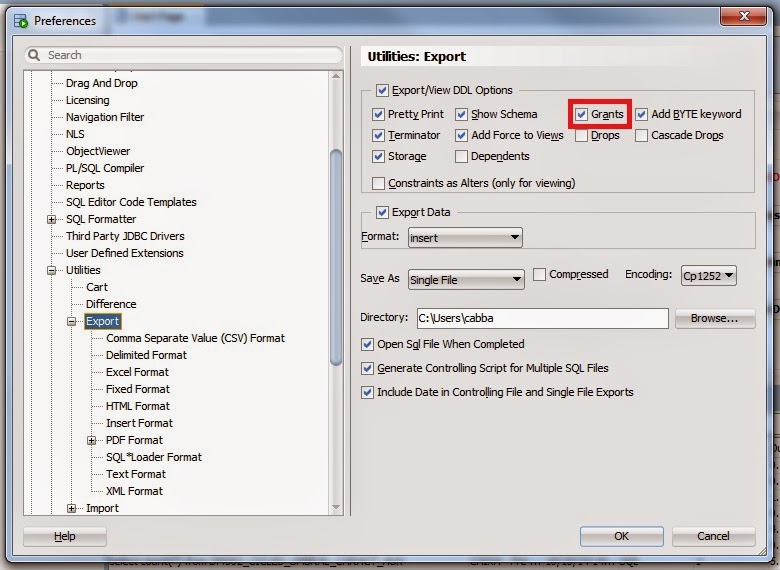
It is quite an annoying thing when you copy DDL generated code for a table in Oracle SQL Developer and you forget GRANTS. This is because in SQL Developer GRANTS are not showed by default.
To show permissions in the code, you have to change the default settings of the product.
In the Tools -> Preferences, locate the Database -> Export node and tick the "Grants" option.


mercoledì 16 luglio 2014

Oracle Tip: Error in BI Publisher Desktop Installation and issue with Microsoft Office 2013

I tried to install Oracle BI Publisher Desktop 11.1.1.7 on my Windows 64 laptop for Microsoft Office 2013 32bits and I got the following error:

"Please make sure JRE version 1.6 or later is installed"

I had Java 1.6 45 32 bit installed and working fine. After struggling in understanding what was wrong, I did the following:

  • Uninstall all Java JRE and JDK from your laptop
  • Install Java JDK 32 bit
  • Install Java JDK 64 bit
  • Reboot the laptop 
  • Install BI Publisher Desktop
The installation went through with no issues, but when I opened Microsoft Word I could not see the BI Publisher tab. The Add-in was not even in the list of available Add-ins for Word.
Google helped me once more and I found a note saying that you have to look for Program Files (x86)\Oracle\BI Publisher\BI Publisher Desktop\DotNetInstallFiles folder and execute setup.exe (close any Office application before starting the installation). I just followed the instructions and at the end the BI Publisher tab was finally there.


martedì 27 maggio 2014

Unix Tip: How to format LS output

Issue
I want to use Unix ls command output and write it to a well-formatted file
Solution:
I just used the following command:

ls -ltra | awk -v OFS=";" '$1=$1'

in a bash script.
OFS parameter is used for specifying the separator for the file.


You can redirect the output to a file and then process it as it was a semicolon delimited file.


martedì 18 marzo 2014

Oracle Tip: Make OBIEE Answers open on Criteria tab

If you are working with a "not so quick" environment (it takes more than a few seconds to show results), it could be annoying waiting for the results to appear until you can switch to the 'Criteria' tab.
To change the default option, go to My Account and select Analysis Editor -> Start on Criteria.


mercoledì 12 marzo 2014

Oracle Tip: Exception in thread "DwgCmdScheduler"

A customer had an issue with a StandAlone ODI Agent. Apparently the agent was up and running, but it was not possible to schedule any job.
ODI version was 11.1.1.6 installed on Unix Server.
I manually stopped the agent and restarted it using the following commands:


./agentstop.sh -NAME=<AGENT_NAME> -PORT=<PORT_NUMBER>


./agent.sh -NAME=<AGENT_NAME> -PORT=<PORT_NUMBER>

2014-03-11 10:36:33.325 NOTIFICATION ODI-1128 Agent <AGENT_NAME> is starting. Application Server: STANDALONE. Agent Version: 11.1.1.6.0 - 19/12/2011. Port: 20910. JMX Port: 21910.
2014-03-11 10:36:36.132 NOTIFICATION ODI-1136 Starting Schedulers on Agent <AGENT_NAME>.
2014-03-11 10:36:36.538 NOTIFICATION ODI-1111 Agent <AGENT_NAME> started. Agent version: 11.1.1.6.0 - 19/12/2011. Port: 20910. JMX Port: 21910.
Exception in thread "DwgCmdScheduler-WORK_REP_PRO" java.lang.NullPointerException
at com.sunopsis.timer.filterbased.SnpsBetweenHoursFilter.equals
(SnpsBetweenHoursFilter.java:112)
at java.util.AbstractList.equals(AbstractList.java:524)
at com.sunopsis.timer.filterbased.FilterBasedTaskScheduleDefinition.equals
(FilterBasedTaskScheduleDefinition.java:50)
at com.sunopsis.timer.SnpsTaskManager.updateDefinitionList(SnpsTaskManager.java:94)
at com.sunopsis.timer.SnpsAbstractScheduler.run(SnpsAbstractScheduler.java:161)
at oracle.odi.runtime.agent.scheduler.OdiAgentScheduler.run(OdiAgentScheduler.java:138)
at java.lang.Thread.run(Thread.java:679)
2014-03-11 10:36:36.805 NOTIFICATION ODI-1137 Scheduler started for work repository WORK_REP on Agent <AGENT_NAME>

The error shows an issue with starting scheduler components of the agent. I googled the error and I did not find anything useful. So I tried creating a new agent with the same parameters (server and port number) and I could start it and schedule jobs. Then, what was wrong with the original agent?
Thanks to Oracle Support, I found out that there is a bug that raises this issue whenever just one column out of S_BEGIN_HOUR and S_END_HOUR in table SNP_PLAN_AGENT of the Work Repository has values in it.


“Problem Description

-------------------

There are two columns in the SNP_PLAN_AGENT, S_BEGIN_HOUR and S_END_HOUR.

Generally, S_BEGIN_HOUR and S_END_HOUR columns either both shows the correct 

time value or both NULL.

However, our ODI customer has faced major problems due to only one of the 

columns showed NULL and the other column showed the time value.”
 

I connected to the Work Repository and executed the following query:


select *
from SNP_PLAN_AGENT
where LAGENT_NAME = <AGENT_NAME>

and I have detected a line having S_BEGIN_HOUR = '01/01/70' and S_END_HOUR = null. 
I have updated the line setting S_BEGIN_HOUR to null in order to have both columns set to null. 


update SNP_PLAN_AGENT 
set S_BEGIN_HOUR = NULL  
where LAGENT_NAME = <AGENT_NAME> AND S_BEGIN_HOUR IS NOT NULL;  
COMMIT;  

I then tried to start the agent and it worked. No warnings and scheduling back up and running!