giovedì 7 gennaio 2021

Unable to visualize the Month name in BI Publisher

 I have been asked to display the dates in a BI Publisher extract in the following format: 

DD-Mon-YY - I.e. 20-Jul-19

I thought it was just a matter of using a TO_CHAR and applying the date mask. To my surprise, I kept on seeing the month being displayed in numeric format. 

The solution was to convert the date to char by adding the NLS_DATE_LANGUAGE parameter.

I.e. to_char(START_DATE,'DD-Mon-YY','nls_date_language=American')


Result: 

lunedì 30 ottobre 2017

[Oracle Tips] Looping over dates in PL/SQL

How do you loop over dates if you want to build your own calendar?
I had to generate a weekly calendar that had every week starting on the previous Saturday of a given date and ending on the next Friday. 
The following procedure solved my problem. The procedure takes two parameters: 
- PROCESS_START_DT (DATE)
- PROCESS_END_DT (DATE)
that define the time interval for which the calendar needs to be generated. 
I.e. If PROCESS_START_DT = '01-Jul-2017' and PROCESS_END_DT = '31-Jul-2017', the expected result will be: 


The result will be stored in a dedicated table. 
The key is to determine the day of the week given a date, in order to establish the previous Saturday and next Friday. To do that, we use the TRUNC(cut_date, 'IW') which will return the first day of the  ISO week. Using simply TRUNC would make the code dependent on the local NLS parameters.  
To loop from the Start Date to the End Date, we convert the dates to the julian format (to_number(to_char(PROCESS_START_DT,'j'))) and we implement a numeric loop starting from the PROCESS_START_DT (temporarly stored in cut_date variable) and we increment it by 7 days at each iteration (cut_date := cut_date + 7)

create or replace PROCEDURE PR_XXX_XXX_GENERATE_CAL(PROCESS_START_DT DATE, PROCESS_END_DT DATE) AS  
cut_date date;
cal_year number;
st_dt date;
end_dt date;
cal_week_nbr number;
table_exists_flg number;
diff_days number; 
begin

/* Reset Variables */ 
cut_date := PROCESS_START_DT;
cal_week_nbr := 1; 

select count(*) into table_exists_flg
from all_tables
where table_name = upper('wc_xxx_xxx_calendar');

/* If the calendar table does not exists, then create it */
if table_exists_flg = 0 then 

execute immediate 'create table wc_xxx_xxx_calendar
(CAL_YEAR NUMBER,
CAL_WEEK_NBR NUMBER,
EFFECTIVE_START_DT DATE,
EFFECTIVE_END_DT DATE)';

end if;

/* Truncate Calendar Table */ 
execute immediate 'truncate table wc_xxx_xxx_calendar';
commit;

for i in to_number(to_char(PROCESS_START_DT,'j'))..to_number(to_char(PROCESS_END_DT,'j')) loop

/* Make sure that always previous Saturday and next Friday are retrieved, independently of the DB Localization */
if  to_date(i,'j') = cut_date then 

/* Removed because it depends on Localization */ 
/* select EXTRACT(YEAR FROM cut_date), trunc(cut_date, 'd')-2 , trunc(cut_date, 'd')+4  */ 

/* Calculate difference in days from cut_date and previous Monday */
select  cut_date - trunc(cut_date, 'IW') into diff_days 
from dual; 

if (diff_days >= 5) then 
/* cut_date is a Saturday or Sunday - always current Saturday is returned */ 
select EXTRACT(YEAR FROM cut_date), trunc(cut_date, 'IW')+5 , trunc(cut_date+7, 'IW')+4  
into cal_year, st_dt, end_dt
from dual; 
else 
/* Any weekday - except for Saturday and Sunday */
select EXTRACT(YEAR FROM cut_date), trunc(cut_date, 'IW')-2 , trunc(cut_date, 'IW')+4  
into cal_year, st_dt, end_dt
from dual; 
end if; 

insert into wc_xxx_xxx_calendar values (cal_year, cal_week_nbr, st_dt, end_dt);
COMMIT; 

cal_week_nbr := cal_week_nbr + 1;
cut_date := cut_date + 7;

end if;

END LOOP;

END PR_XXX_XXX_GENERATE_CAL;

mercoledì 23 agosto 2017

[Oracle Tips] Changing Default End Date in SCD KM

ODI has an IKM for Loading SCD Type 2 dimensions. The IKM is 'IKM Oracle Slowly Changing Dimension'. The default value for Slow Changing Dimension (SCD) Type 2 End Date is "01 January 2400".
You may need to change this End Date value because of the source data that you are using to populate the Slowly Changing Dimension. In a recent project, I had to deliver an integration between Oracle Fusion HCM and an on-premise DWH. The End Date for Fusion HCM objects is "31-December-4712". So, if you want to use the ODI IKM to create SCDs you need to customize it.
To do so, first you need to create a copy of the default IKM.

Then open the duplicated object and locate the steps where the default End Date is used.
The step that needs to be customized is 'Insert flow into I$ table'. Edit the Target code to replace '2400-01-01' with '4712-12-31' or whichever value you want to use as End Date.


Once it is done, then you can use this customized IKM in your interfaces for populating SCDs Type 2. 


martedì 22 agosto 2017

[Oracle Tips] Looking for a value in all table columns of a database schema

I have been working on a project where honestly I did not have much knowledge of the data model of the schema I was using. Most of the times I had to figure out in which table (and column) I could find a certain value. Not the best strategy, but Oracle documentation and the project schedule were not not of much help.
The following procedure was extremely useful and has helped me out in many occasions. Depending on the size of the tables that are being scanned, the procedure can take quite a long time to be executed, but it will retrieve all the values that match 'v_search_string' in any column of the datatype and the schema specified as a parameters.

set serveroutput on size 100000;

declare
    v_match_count integer;
    v_counter integer;

    -- The owner of the tables to search through (case-sensitive)

    v_owner varchar2(255) := 'SCHEMA_OWNER';
    -- A string that is part of the data type(s) of the columns to search through (case-insensitive)
    v_data_type varchar2(255) := 'COLUMN_DATATYPE';
    -- The string to be searched for (case-insensitive)
    v_search_string varchar2(4000) := 'VALUE_TO_BE_SEARCHED';

    -- Store the SQL to execute for each table in a CLOB to get around the 32767 byte max size for a VARCHAR2 in PL/SQL
    v_sql clob := '';
begin
    for cur_tables in (select owner, table_name from all_tables where owner = v_owner and table_name in
                       (select table_name from all_tab_columns where owner = all_tables.owner and data_type like '%' ||  upper(v_data_type) || '%')
                       order by table_name) loop
        v_counter := 0;
        v_sql := '';

        for cur_columns in (select column_name from all_tab_columns where
                            owner = v_owner and table_name = cur_tables.table_name and data_type like '%' || upper(v_data_type) || '%') loop
            if v_counter > 0 then
                v_sql := v_sql || ' or ';
            end if;
            v_sql := v_sql || 'upper(' || cur_columns.column_name || ') like ''%' || upper(v_search_string) || '%''';
            v_counter := v_counter + 1;
        end loop;

        v_sql := 'select count(*) from '  || v_owner || '.' || cur_tables.table_name || ' where ' || v_sql;

        execute immediate v_sql
        into v_match_count;

        if v_match_count > 0 then
            dbms_output.put_line('Match in ' || cur_tables.owner || ': ' || cur_tables.table_name || ' - ' || v_match_count || ' records');
        end if;
    end loop;

    exception
        when others then
            dbms_output.put_line('Error when executing the following: ' || dbms_lob.substr(v_sql, 32600));
end;
/


Here is the output of the procedure if I look for 'CRISTINA' string of 'VARCHAR' type in any table column in the 'A' schema: 


Note: the procedure will work only if you have the right privileges to query all_tables and all_tab_columns and you have at least read privileges to the schema
 

mercoledì 31 maggio 2017

ODI Tips: ODI initialization hangs

I have been on the same OBIA/ODI project for almost two years now and every now and then I get this issue.
ODI Studio hangs on ODI initialization - Initialize Search Engine window.


No matter how much patiently you wait, it won't allow you to progress further.
The only option you have is to:
  1. Kill ODI Studio process using Task Manager
  2. Locate windowinglayout.xml file in your computer. Typically, you will find it under: C:\Users\<USER>\AppData\Roaming\odi\system11.1.1.9.0\o.ide.11.1.1.9.40.66.73   

  3. Delete the file and restart ODI Studio


giovedì 26 gennaio 2017

Oracle Tip: recovering SQL Developer passwords

I must admit that I am quite lazy (and not a very tidy person either). When I am given a new database connection to work with, I configure it in SQL Developer and save the password (so I do not have to type it when I connect and, more important, I do not have to remember it or store it safely somewhere else - shame on me!). As a consequence, when I am ask to provide the password to somebody else, it happens quite often that I do not remember it.
SQL Developer stores the saved passwords in an encrypted fashion in a file called connections.xml, which is normally available in \AppData\Roaming\SQL Developer\system folder.


Googling around, I have found a number of Java routines that can decrypt the passwords, but why spending time in compiling some Java code if a solution is already available?
This link http://show-me-password.tomecode.com has the instructions for installing a simple SQL Developer extension. It works great and it's the perfect shortcut for a lazy and forgetful programmer.

mercoledì 18 gennaio 2017

ODI Tip: Get Physical Schema from Logical Schema in an ODI variable

When it comes to file paths you do not want to hard-code them because they will need to be manually updated when you migrate from one environment to another.
The best way to retrieve a file path at runtime is to get it from the physical schema that you have configured in the Topology.
You can create an ODI variable and use the following code for its refresh:


select '<%=odiRef.getSchemaName("EXTRACT_FILES_LS","W")%>' 
from dual

where EXTRACT_FILES_LS is the Logical Schema name.


When you migrate to a new environment, the only thing that will need to be updated is the Topology Physical Schema and by refreshing the variable you will have the updated file path.

martedì 11 ottobre 2016

Oracle Tip: executing SQL scripts in SQL Developer

One common problem with SQL Developer is executing huge SQL scripts (i.e. INSERT statements from the export of a big table).
Typically you will get the following error when trying to open the file: 


which is caused by an OutOfMemoryError of the Java Heap space.


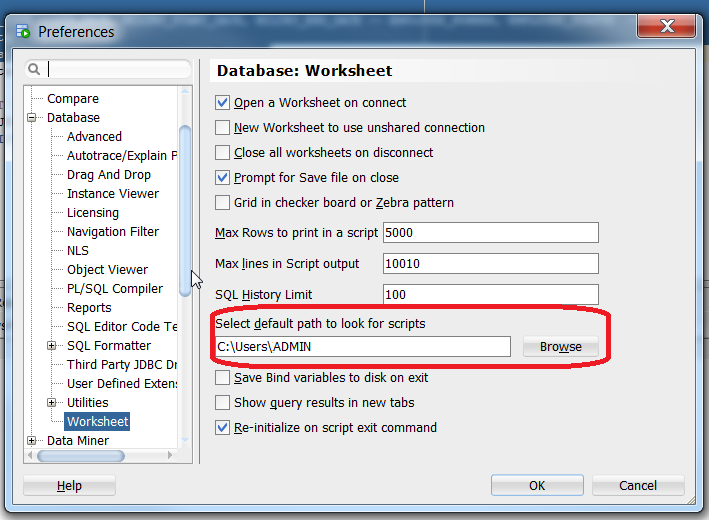
One convenient way to execute .sql without having to open the script in the SQL Developer editor is to configure the default path for scripts.
Go to Tools -> Preferences->Database->Worksheet:


and select the path where you want to place the SQL scripts to execute.
Then, go to the SQL Developer editor and simply use the @ command to reference and execute the script.


lunedì 10 ottobre 2016

ODI Tip: Generating flat files with spaces in column names

I had a requirement of generating a .csv file with header out of a database table.
I had created the model as follows:
  • File Format: Delimited
  • Record Separator: Unix  
  • Field Separator: , (comma)
In the interface, I had placed the file as Target Datasource and used 'IKM SQL to File Append' with the following options:


Unfortunately, the header columns were truncated at the first space and adding double quotes did not help. The column header were all truncated after the first space found.
After investigating, I came to the conclusion that there is was no quick or easy way to deal with spaces. I guess the only way is creating a custom version of the IKM.
Therefore, since I have very little time, I have replaced the spaces with underscores and added a OdiOSCommand in the package to replace the underscores with spaces in the output file.


ODIOSCommand is a more flexible version of OSCommand and allows you to invoke a sed command to do the replacement in place (-i) of the underscores with spaces.

sed -i 's/_/ /g' <filename>

lunedì 18 luglio 2016

Oracle Tip: Exception getObjectName("R", "OBI_EXEC_SESS_<$=Y$>", "D")

When running OBIA Load Plan, today I got into the following error when running SIL_DomainGeneral_CM_Source_Load scenario:


com.sunopsis.tools.core.exception.SnpsSimpleMessageException: ODI-17517: Error during task interpretation.
 Task: 6
java.lang.Exception: The application script threw an exception: com.sunopsis.tools.core.exception.SnpsSimpleMessageException: Exception getObjectName("R", "OBI_EXEC_SESS_<$=Y$>", "D") :  BSF info: Run Alter Session Commands-SRC (DB Link) at line: 0 column: columnNo


The solution to this error is given in Doc ID 1948605.1 from Oracle Support.
You should connect to ODI Physical Architecture in ODI Topology and check that BIAPPS_BIACOMP has got a Default Schema defined (and that connectivity is in place). If there is no Physical Schema defined, then check the option. 


If this does not solve the problem, check BIAPPS DWH Physical Connection. Make sure that at least one of the physical schemas is marked as Default Schema.


Somehow during migration activities, we lost the selection on one of them.


lunedì 29 febbraio 2016

Configuring PGP Keys in GNU Private Guard

Imagine you are receiving a PGP encrypted file from a third-party. 
The file has been encrypted using the customer's Public Key and now you have to decrypt it in a separate server where Gnu PG is installed. 
The first thing you need to do is to import the keys so they can be used to decrypt the message.
The following command is used to import the Public Key: 

gpg --import newkey.txt
 
If a valid Public Key is given, this is how the command output should look like: 

bash-4.1$ gpg2 --import newkey.txt
gpg: key xxxxxx: "Public Key Description <email@xxx.com>" not changed
gpg: Total number processed: 1
gpg:              unchanged: 1
 

To import the Private Key, use the following command: 

gpg --allow-secret-key-import --import newpriv_key.txt
 
To check if keys have been imported correctly, you can use the following command:

bash-4.1$ gpg --list-keys
/xxxx/xxxxx/.gnupg/pubring.gpg
-----------------------------------
pub   2048R/xxxxxxx 2016-02-17 [expires: 2019-02-16]
uid                 Public Key Description <email@xxx.com>

sub   2048R/xxxxxxx 2016-02-17 [expires: 2019-02-16]

The Private Key provided has got a passphrase. So if you want to decrypt a sample file that has been encrypted using the associated Public Key, you should use the following command.

bash-4.1$ echo <passphrase>|gpg --output test.txt --batch --passphrase-fd 0 --decrypt test.gpg
gpg: encrypted with 2048-bit RSA key, ID
XXX450C8 , created 2016-02-17
      "
Public Key Description <email@xxx.com>"
bash-4.1$ more test.txt
Hello World!!!


If you are getting an error when passing the passphrase, try setting up the following variables: 

 
export GPG_TTY=`tty` 
export PINENTRY_USER_DATA="USE_CURSES=1"

By doing this, I was able to decrypt the message successfully.

martedì 26 gennaio 2016

Automate DOS commands - Ping example

Imagine you have been given the lovely task of finding out the IP address of more than 40 servers. Do you really want to do it manually? Definitely I do not.
I have created a script and, even if I have to admit that it took me almost more time to write it than doing the task manually, I hope this can save someone's else time.
The script I have written looks like this:

@ECHO OFF
ping -n 1 <ServerName1> | for /F "tokens=*" %%a in ('findstr Reply') do @echo
<ServerName1>:%%a
ping -n 1
<ServerName2> | for /f "tokens=*" %%a in ('findstr Reply') do @echo <ServerName2>:%%a
exit


The option "-n 1" is used to define how many times the server is pinged. One time is enough to get the following output:

Pinging <ServerName1> [192.143.52.103] with 32 bytes of data:
Reply from 192.143.52.103: bytes=32 time=45ms TTL=59
Ping statistics for 192.143.52.103:
    Packets: Sent = 1, Received = 1, Lost = 0 (0% loss),
Approximate round trip times in milli-seconds:
    Minimum = 45ms, Maximum = 45ms, Average = 45ms


The second part of the command parses the output of the ping command looking for a string starting with 'Reply' and prints the results.
@ECHO OFF is used to prevent the script to print the DOS command in the output.
Here is an example of output file:

<ServerName1>:Reply from 192.143.52.103: bytes=32 time=18ms TTL=59 <ServerName2>:Reply from 191.143.52.103: bytes=32 time=19ms TTL=59


I have decided to separate the server name from the 'Reply' string using a semicolon, but it is mainly because this way I can treat the output as a simple semicolon-delimited file.

martedì 10 novembre 2015

Changing caption of Embedded Object in MS Word

Recently I have spent a lot of time writing functional documents, which translates into producing tons of MS Word pages and Excel Spreadsheets. And since everybody knows how boring it is, the best thing you can do is re-use docs you have already written. Although it can save you a considerable amount of time, it could be very annoying having an attached spreadsheet with a caption that reminds everybody that you are being lazy.
To change it,  right-click on the Object and select Convert option:


Then select "Change Icon" and change the Caption to the one you want. Be aware that even if it looks greyed-out, you can still edit the Caption. God bless MS!


venerdì 30 ottobre 2015

Another week in the life of a cystinuric

It's a matter of not surrending. It's a matter of not admitting that this horrible disease is sucking my whole life out of me. 
I cannot work, I cannot enjoy being out because of the fear of the unpredictable pain, I am soaked in fear. 
I hate the person I am now. I do not resemble to the person I used to be. After three surgeries, uncountable infections, stents, pain killers and every possible kind of medicine, doctors, urologists, nephrologists, it is getting harder and harder to go on.
If I could put on a scale all the pain I have been through since I was a kid, it would explode. And the worst thing is that there is no reward. You won't get any prize for being strong. And asking "Why me?" is totally pointless. It won't go away.
The only thing you can think about is the pain to stop. Nothing else. There is no energy or space for anything else. Nobody deserves something like this. Nobody. 
 

mercoledì 7 ottobre 2015

Oracle Tip: Listing the content of a .dmp file

If we have a .dmp file that has been produced using the expdp utility, it is possible to retrieve the DDL for all objects in the .dmp file by using the following options: 


impdp ... SQLFILE=myddl.sql DUMPFILE=<dumpfile>

 
If the dump file has been produced using imp utility instead, the following command will give you the list of tables:

imp ...
show=Y file=<dumpfile>


This should tell you the list of objects you have in your dump file before importing it.

giovedì 27 agosto 2015

Etapa 4 - De Ribadiso da Baixo a Pedrouzo

Hacer memoria de esta etapa todavía duele. Ha sido la etapa mas dura de todo el camino. Me levanto demasiado temprano. Todo el mundo ha puesto su alarma a las 5 de la mañana y ya que estoy despierta me levanto yo también y empiezo a andar alrededor de las 7 menos cuarto. Los primeros kms son una cuesta insoportable hasta Arzua. Me arrepiento mil veces de no haber hecho un pequeño esfuerzo mas el día anterior. Noto en seguida que algo va mal. La mochila molesta y animicamente me encuentro fatal. Llego al momento del desayuno y me derrumbo completamente. No tanto por la escasez de higiene del lugar y por la tostada con jamón y tomate que sabe a rancio, sino porque hoy me ha invadido una tristeza infinita. Ni siquiera el café con leche con la carita de payaso diseñada por el dueño del bar me levanta la moral.
Al poco de abandonar el bar, echo a llorar. Es un llanto silencioso y sin consuelo. Me pregunto que es lo que estoy buscando. Donde esta' el perdón que no he encontrado en todos estos años? De todo el mal que me han causado, porque sigo pensando que la única culpable soy yo? Y en parte lo soy. No supe ver que el amor, del que siempre voy hambrienta, en realidad no existía. O existió pero yo también hice mi parte para destrozarlo. Levante demasiado la voz, pidiendo a gritos y a insultos una ayuda que unos oídos sordos jamas me darían. Busque paz y calma, en un mar seco y lleno de rocas. Me lance de cabeza al fracaso, sin intentar evitarlo. Yo tampoco fui perfecta, quizás todo este dolor que nunca me abandona es porque el amor que tanto necesito, yo tampoco lo supe dar. Echo de menos a mi vida de entonces, a esos paisajes, a la familia que nunca fue mía, pero ya no a ti. Para ti tampoco hay perdón. Ni lo hay para los que solo se disfrazaron de amigos, dando el golpe de gracia a un alma que no conseguía que las heridas dejaran de sangrar. 
Un paso tras otro me pregunto si habrá un día en el que ya no salten las lagrimas al recordar. Incluso ahora que escribo se me cierra el aliento y se me hace un nudo en el estomago y no lo puedo evitar. Kilómetro tras kilómetro de lagrimas y sudor (literales), voy llegando a O Pedrouzo. No me siento con fuerza para nada y menos de compartir litera con unos chavales adolescentes y fiesteros. Me gasto 40 euros para una bonita habitación en una pensión. Sola con mis pensamientos y mi dolor que nunca calla, a intentar descansar porque al dia siguiente ya me espera Santiago.

"Las cosas que no pueden ser
Son todas las que he sido yo"


martedì 25 agosto 2015

Etapa 3 - De Palas de Rei a Ribadiso da Baixo

La tercera etapa es una etapa bastante desafortunada. En un primer momento pensé en parar en Melide, el pueblo tan famoso para el pulpo a la gallega. Me sobran días, ya que por culpa del esguince salí de Sarria en lugar de Ponferrada, y una idea seria partir la etapa convencional desde Palas de Rei a Arzua en dos.
Me levanto muy temprano y empiezo a andar, me siento bien y a las 10 de la mañana ya estoy practicamente en Melide. Al entrar en la provincia de A Coruña, me siento realmente contenta y satisfecha. Las conchas se vuelven amarillas y me siento genial.

Entrada a la Provincia de A Coruña
Decido parar en un bar para desayunar y como tengo mucha hambre decido pedir un bocadillo de tortilla de patatas. Primer error del día. La chica me trae un ladrillo de la peor tortilla de España. Compacta y freída en el aceite de un coche. En el estomago la mezcla se convierte en un bloque de hormigón, así que cuando al cabo de una hora llego al famoso templo del pulpo a la gallega, no tengo hambre ninguna.
Pulperia Ezequiel (Melide)
Como todos los peregrinos entran, yo no me voy a echar para atrás. El lugar esta lleno de gente que a las 11 de la mañana se sienta a comerse su ración de pulpo. El olor es nauseabundo y me paso un rato horroroso mientras comparto mi pulpo con unas madrileñas que había conocido la noche anterior en el hostal de Palas de Rei. En principio había decidido parar en Melide, pero al salir del restaurante y con el asco en el cuerpo por la mezcla de tortilla y pulpo (lo siento señor Ezequiel, pero he comido pulpos bastante mejores por ahí) decido ponerme en camino de vuelta. La idea es llegar al pueblo donde habían dicho que iban a parar los italianos, al menos tendré compañía. El problema es que todavía faltan casi 15 kms y la calor empieza a apretar.
Camino un tramo con las madrileñas que no se demuestran muy amigables que se diga, así que largos tramos me los paso sola. En una cuesta super calurosa, agradezco haberme traído el agua termal, que hasta el día anterior me había parecido otro inútil trasto y que me había negado a tirar porque lo había pagado caro (bendida mi tacañeria!). Me ayuda una japonesa a sacarla de mi mochila y le ofrezco a ella también, porque va mas tapada que un apicultor y con una mochila mas grande que ella. Este gesto tan tonto como compartir el agua termal es lo que hace bonito el Camino. Como hemos llegado yo y ella, desde mundos tan distintos, a cruzarnos en la cumbre de una cuesta infernal y a ayudarnos, sin saber nada la una de la otra, es lo que hace que esta experiencia sea mágica e inolvidable.
Cuando veo que faltan "solo" 40km me vuelvo a animar un poco. Una francesa me saca una foto. La cuenta atrás de los kilometros es lo que te mantiene entretenido y que te empuja a no abandonar, a pesar del cansancio y del dolor que, al pasar las horas, se apodera de todo tu cuerpo.

Como una campesina rusa


Después del puente medieval sobre el rio Iso, finalmente llego al albergue. El día es soleado y caluroso. Lavo mi ropa y disfruto de la tarde. Los italianos nunca llegaran, pero compañía no me falta. Se respira tanta paz y estoy tan orgullosa de mi, que ni siquiera las pulgas que me pican en los brazos me sacan la sonrisa.
En el puente de Ribadiso
 Una birra y a prepararse para el dia siguiente que Santiago esta' a la vuelta de la esquina.

La mejor compañera


mercoledì 19 agosto 2015

Etapa 2 - De Portomarin a Palas de Rei

Escribir después de tantos días sobre esta etapa se me hace complicado. Tiene que haber sido la etapa con menos encantos porque apenas me acuerdo de ella. Me acuerdo de largos tramos pegados a la carretera, que hay que cruzar y volver a cruzar en varios puntos. Palas de Rei tampoco tiene nada interesante para visitar, así que casi no hay fotos de ese día.
Portomarin en la primeras horas de la manyana  esta' envuelta en la niebla.

Cruzando el puente a la salida de Portomarin
Es muy pintoresco, pero enseguida las sensaciones buenas se esfuman. El problema mas grande es la mochila. Me pesa demasiado y no consigo acomodarla. Hay momentos en los que me saltan las lagrimas, pero en ningún momento pienso abandonar. Es como si una fuerza te empujara, hay que llegar a Palas de Rei como sea. Allí me espera el Albergue San Marcos (http://alberguesanmarcos.com/), que terminara' siendo el albergue mas nuevo y mas limpio de todo el camino.
Al llegar me vuelvo  a encontrar con los italianos que conocí' el día anterior, a los cuales se han sumado otras chicas italianas. Después de tanta soledad se agradece una cena en companya. Me entra nostalgia de mi tierra, de las cenas con los amigos, de tiempos lejanos, de amigos perdidos en la niebla de los sentimientos.